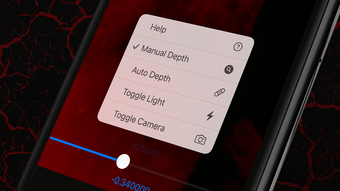

X-Vein: Real-Time Vein Visualization for Medical Training
Overview
X-Vein is a specialized desktop application developed by the X-Vein Team, designed to support medical professionals and students in mastering the critical skill of vein detection. The software leverages visible light penetration and hemoglobin light absorption principles to visualize blood vessels beneath the skin, offering a simulated training environment for clinical practice. By analyzing different color wavelengths, X-Vein enhances the visibility of veins across varying skin layers, mimicking the functionality of medical saturation monitoring systems. This tool is particularly valuable for healthcare providers who perform venous access procedures, such as phlebotomy and IV insertion, as it enables hands-on learning without the need for live patients during initial training.
The application targets medical students, nursing trainees, and practicing clinicians seeking to refine their vein identification accuracy. It supports skill development through interactive visualization, helping users build confidence and reduce procedural errors. While X-Vein provides a digital simulation of vein patterns, the developer emphasizes that venous access remains a three-dimensional skill requiring real-world experience, in alignment with World Health Organization guidelines. The software is intended as a supplementary training aid, not a diagnostic tool. Its real-world usage spans clinical education, simulation labs, and self-paced skill enhancement in healthcare training programs.
Key Features & Capabilities
- Real-Time Vein Visualization – Uses visible light and hemoglobin absorption principles to display underlying blood vessels, simulating how veins appear under specific wavelengths.
- Interactive Training Interface – Offers a user-friendly platform for practicing vein location techniques in a controlled, repeatable environment.
- Wavelength-Based Simulation – Mimics the behavior of different color lights penetrating skin layers to enhance vascular visibility.
- Medical Skill Development Focus – Designed specifically for clinical training, supporting the acquisition of foundational venous access skills.
- Compliance-Oriented Design – Aligns with World Health Organization recommendations on procedural training and patient safety.
These capabilities allow users to repeatedly practice vein identification without physical constraints. Medical students can use the tool to build foundational skills before clinical exposure, while experienced professionals may use it for refresher training. The interactive nature of the interface supports active learning, reinforcing muscle memory and visual recognition. Since the software does not rely on live imaging, it ensures consistent training conditions across sessions. The simulation is intended to mirror real-world scenarios without replacing hands-on experience.
User Interface, Workflow & Performance
The user interface of X-Vein is structured to prioritize clarity and ease of navigation, aligning with the needs of medical training environments. The layout is designed to minimize distractions, focusing attention on the visualization of vascular structures. Navigation is straightforward, allowing users to initiate training sessions, adjust simulation parameters, and review performance with minimal steps. The workflow emphasizes simplicity, enabling users to start practicing vein detection immediately after launch.
Performance details were not specified by the developer. However, given the application’s size of 45 MB and its focus on real-time visualization, it is expected to operate efficiently on modern desktop systems. The developer did not provide additional system requirements, nor did they specify CPU or RAM usage patterns.
General software behavior suggests stable operation during training sessions, though actual performance may vary based on hardware configuration. Stability during extended use has not been publicly documented. The application appears to function as a standalone desktop tool with no known dependency on internet connectivity for core functionality.
Compatibility & System Requirements
X-Vein is compatible with both Windows and Mac operating systems, making it accessible to a broad range of users across different academic and clinical environments. The software is available in version 1.0.0 and has a download size of 45 MB, indicating a lightweight installation. This compact footprint suggests minimal impact on system resources during operation. The developer did not specify exact hardware requirements, including minimum processor speed, RAM, or graphics capabilities.
Compatibility information was partially provided, with no mention of specific Windows or macOS versions. The application may function on recent desktop systems, but users should verify compatibility with their existing setup. No additional peripherals or external devices are required for core functionality. The absence of detailed system specifications means users should proceed with caution when deploying the software on older or low-spec machines. For optimal performance, it is recommended to run the application on systems meeting standard desktop computing standards.
Pros and Cons
Pros
- Free to use, eliminating cost barriers for educational institutions and individual learners
- Specialized focus on medical training enhances relevance for healthcare professionals and students
- Real-time vein visualization supports practical skill development in a safe, repeatable environment
- Lightweight design (45 MB) ensures fast installation and minimal storage usage
- Complies with WHO guidelines, reinforcing its educational credibility
Cons
- Exact system requirements were not listed, which may affect installation on older systems
- Limited to desktop platforms; no mobile or tablet support available
- No information on update frequency or future feature roadmap
- Relies on simulation, not live imaging, so it cannot replicate real patient variability
- Performance behavior under heavy use has not been documented
FAQ Section
Is X-Vein compatible with both Windows and Mac?
Yes, X-Vein is designed to run on both Windows and Mac operating systems, as stated in the product details.
Is the software safe to use for medical training?
X-Vein is intended as a training aid and is not a diagnostic tool. It supports skill development in line with World Health Organization guidelines, but users should rely on real-world practice for clinical application.
Does X-Vein require an internet connection?
The software functions as a standalone desktop application, and no internet connection is required for core training features.
Can I update X-Vein to the latest version?
Updates are available through official channels. The current version is 1.0.0, and users are encouraged to check for new releases periodically.
What type of license does X-Vein use?
X-Vein is available at no cost, and the developer has not specified a formal license type beyond its free availability.
Final Thoughts + CTA
X-Vein stands out as a focused, accessible tool for medical education, offering a unique approach to vein detection training through real-time visualization. Its free availability, lightweight design, and alignment with clinical best practices make it a valuable asset for medical students and healthcare professionals alike. While the lack of detailed system requirements and update information limits full transparency, the software delivers on its core promise: a safe, repeatable platform for skill development. It is particularly well-suited for training environments where hands-on practice is limited. For those seeking to improve vein identification accuracy in a controlled setting, X-Vein provides a practical and professional-grade solution.
Download X-Vein now to enhance your clinical training with real-time vein visualization technology.







